project
vworkflow-v2.4.0Mirror each Spec Kit feature onto a GitHub Project (v2): create a parent feature issue, advance its Status column through the Spec Kit lifecycle (open -> analysis -> engineer-review -> ready -> in-progress -> in-review -> done), and, in standalone use, create one native sub-issue per task and close it as its task is checked off (under Sanduq Workflow, Workflow owns task issues). Board-agnostic initialization lets each repo choose required/automatic or optional/manual sync hooks. Idempotent and no-regress.
Project sync (project)
Purpose: mirror each Spec Kit feature on a GitHub Project (v2). Project creates a parent issue, moves its Status column through the lifecycle and, in standalone use, creates one sub-issue per task.
| Lifecycle phase | After specify, plan, analyze and tasks; before and after implement |
| Hooks | Six optional hooks; Project Init can make them mandatory (hooks) |
| Commands | init, sync (reference) |
| Requires | Python 3.11 or later; uses gh when available |
| Standalone | Yes |
| License | MIT |
Setup
specify extension add project
gh auth refresh -h github.com -s project,read:project
/speckit-project-init Discover the booking application's Project, map lifecycle columns, and select required sync.
Init asks whether sync hooks are required (automatic) or optional (ask first). It maps each
phase to a real board column and writes config.json. Commit it with .specify/extensions.yml.
Example
/speckit-project-sync Synchronize the refund parent and completed task IDs without duplicate sub-issues.
For a dry run, call the sync script directly:
python .specify/extensions/project/scripts/project_sync.py --phase auto --dry-run. Add
--summary for one result line (ok, skipped or error).
How it runs
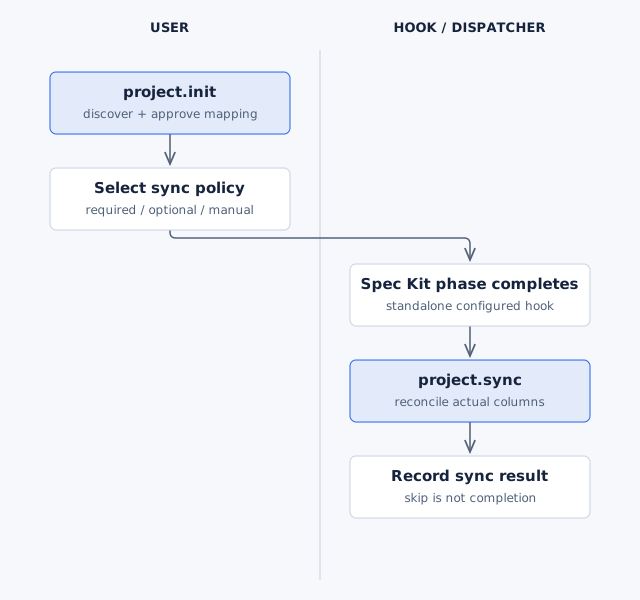
Required sync runs automatically at each phase. Optional hooks ask first. In the managed Workflow,
Workflow requires automatic sync and its own adapter creates and closes task sub-issues. Each
Workflow claim names the phase and the exact sync command, so the dispatcher runs it without
opening the sync command file. Workflow's board mode (init --board full|minimal|none) decides
which phases it writes: minimal writes only Ready, In progress, In review and Done without
task sub-issues, and none runs without a board.
Editable source.
Limits
- If
gh, its scopes, a GitHub remote orconfig.jsonis missing, sync logs a skip and exits 0. A skip is not a completed sync. - A malformed
.specify/project-sync-state.jsonstops the sync with a message. Restore it from git or fix it, then rerun. Sync no longer resets it, which made the next run create duplicate issues. - An interrupted run adopts the task sub-issues it already created, so a rerun does not duplicate them.
doneruns only when you pass it; Project does not move a feature to done by itself.- An organization board needs
ownerType: org. Init detects it; rerun Init if an older Init recordeduser. - Project only touches the configured board and issues in the
originrepository.
Package details: Project README.
Stats
Version
Install
Using the Specify CLI
specify extension add project --from https://github.com/samykabu/sanduq/releases/download/project-v2.7.2/project.zip